Place the SVG over a dark rectangle in your drawing app. If the white disappears, you were seeing the app's white page through a transparent area. If it stays, check the picture itself.
Match what you see
| What you see | What to check | What to do |
|---|---|---|
| The white disappears on a dark background | The SVG is transparent there | Test it on the background where you plan to use it |
| A white rectangle stays visible | It may be a shape in the SVG, or part of the original picture | Hide that shape in your editor and check the rest of the drawing before deleting it |
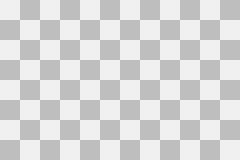
| Gray checkerboard squares stay visible | You may have saved a screenshot of transparency rather than a transparent image | Find the actual PNG or WebP download and use that |
| A thin pale line surrounds the drawing | The original edge may already contain white pixels | Compare the original on dark and light backgrounds; repair the edge before converting again |
Keep white details that belong to the picture
Eyes, letters and highlights may be white on purpose. Save a copy before editing. Hide only the suspected background, then check that nothing important disappeared.
Compare a transparent example
The same heron PNG and SVG appear on light and dark backgrounds below. Compare the area outside the crest with the white feathers inside the drawing. The background should show through only where the file is transparent. Download both files to repeat this check; do not remove white parts just because they match a white page.


Will converting a JPEG remove its white background?
No. A JPEG does not store transparency. ImageSVG converts the background along with the drawing. Use a transparent original, or remove the background in an image editor first. Check small gaps and soft edges after removing it.
A checkerboard can be part of the picture
Download this teaching PNG. Put it over light and dark backgrounds: the same gray squares stay visible because they are opaque pixels. A checkerboard pattern is not proof of transparency. This sample was made for this explanation, not converted by ImageSVG.